What ham radio satellites actually are (in plain English)
A ham radio satellite is just a repeater in space. The same idea as the local repeater you may already use — uplink on one frequency, downlink on another — except the repeater is zipping across the sky at five miles per second. When you can hear it, you can work through it. When it slides below the horizon, the contact ends.
Most amateur satellites orbit a few hundred miles up in low Earth orbit. That gives them a 10–15 minute window above your horizon on any given pass — long enough to make a contact, short enough that you have to be ready. The good news: a Technician-class license is all you need to use them in the United States, and a modest dual-band handheld radio is enough to get started.
The realistic expectation: a handful of contacts per month when you are starting out. Satellite work rewards patience and consistency more than it rewards expensive gear.
The three satellites covered here — at a glance
These three FM satellites are the best place for a beginner to start. All three work with a dual-band handheld radio. All three require a real antenna (not the rubber duck that came with your radio). None of them require a computer in the loop.
| Satellite | Uplink | Downlink | Tone | When it’s on |
|---|---|---|---|---|
| SO-50 | 145.850 MHz | 436.795 MHz | 67.0 Hz PL | Every pass (10-min timer — arm with 74.4 Hz if quiet) |
| AO-91 | 435.250 MHz | 145.960 MHz | 67.0 Hz PL | Sunlit passes only |
| ISS (NA1SS) | 145.99 MHz* | 437.80 MHz | 67.0 Hz PL | Voice repeater (when active) / APRS 24/7 |
The short version: SO-50 is the daily workhorse — turn it on, listen for the downlink, call CQ when the pass is overhead. The ISS is the trophy contact — busy, unpredictable, but unforgettable when you make it. AO-91 rounds out the set: same FM simplicity, but flipped — you transmit up on 70cm and listen down on 2 meters, which makes it the easiest of the three to hear.
What you need — the Under $200 starter setup
You can work FM satellites with gear that costs less than a decent dinner out. Here is the realistic minimum.
- Dual-band HT. Any modern dual-band handheld will do. The Baofeng UV-5R is the budget classic — it works, but the receiver is rough at the edges. Baofeng owners: you’ll need an SMA adapter — the UV-5R uses a reverse-SMA connector. The Yaesu FT-70DRand Kenwood TH-D75 are noticeably cleaner. Whatever you choose, make sure it can transmit on 2 meters and 70 centimeters with a PL tone.
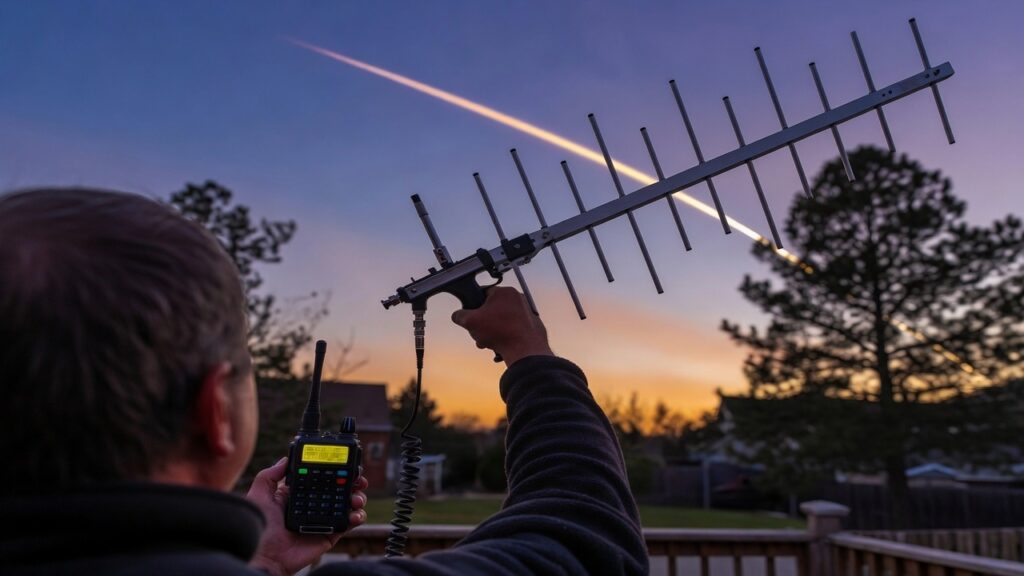
- A real satellite antenna. The stock rubber duck that came with your radio will not work. You need a dual-band antenna with gain, and ideally one you can hold at an angle to track the satellite across the sky. Three popular choices:
- Arrow II satellite antenna — handheld dual-band Yagi, the gold standard. About $160.
- Elk 2m/70cm log-periodic — lighter than the Arrow, easier to hold overhead. About $140.
- Homemade tape-measure Yagi — WB2HOL’s classic design, buildable for under $50 in parts. A great weekend project if you are handy.
- Notebook and pen. Paper logging is fine. Callsign, grid square, signal report, time. That is all you need.
Total cost for a working setup: roughly $80–$200 depending on whether you already own an HT. If you have a dual-band radio and a tape measure antenna, you’re looking at the cheaper end of that range.
SO-50 — your first satellite
SO-50 is the satellite most beginners should start with. It’s been on the air since 2002, passes are predictable, and the FM repeater is forgiving of small mistakes.
SO-50 receives on 145.850 MHz and retransmits on 436.795 MHz. The uplink requires a 67.0 Hz subaudible tone (CTCSS/PL). The downlink has no tone — just listen on 436.795 MHz FM.
Here’s the part that trips people up: SO-50 runs on a timer. The repeater stays on for 10 minutes at a time, and somebody has to arm it. Arming it is simple — you transmit about two seconds of dead carrier with a 74.4 Hz tone, and the satellite wakes up. After that, everyone operates normally using the 67.0 Hz tone.
The good news is you’ll almost never have to do this yourself. SO-50 is one of the busiest satellites up there, and on any pass over North America, somebody has already armed it before you key up. But program a second memory channel with the 74.4 Hz tone anyway. If you catch a quiet pass and hear nothing, send that two-second burst, switch back to your 67.0 Hz channel, and the repeater is yours. There’s no schedule to memorize — SO-50 is available on every pass, every day. If you can see it on your tracking app, you can work it.
SO-50 is not a standard repeater with a standard offset. You will need to set up the channel manually: 145.850 MHz transmit, 436.795 MHz receive, 67.0 Hz tone on transmit only. Most modern HTs allow you to set split frequencies for a single memory channel — check your radio’s manual for “split memory” or “non-standard offset.”
The satellite is moving fast relative to you, which means the downlink frequency drifts slightly during the pass — higher as it approaches, lower as it recedes. You will need to nudge your receive VFO down by a few kHz over the course of the pass. If the signal sounds like Donald Duck, you are off frequency — adjust until the audio clears up.
From horizon to horizon, a typical SO-50 pass lasts 10–15 minutes. The usable window — when the satellite is high enough above the horizon to clear terrain — is more like 5–8 minutes. That’s your chance to make a contact. Listen first, then call CQ when the frequency is clear.
AO-91 — a great second satellite
Once you’ve made a contact through SO-50, AO-91 is the natural next step. It’s another FM repeater in the sky, launched in 2017, and it flips everything around: you transmit UP on 70cm at 435.250 MHz with a 67.0 Hz tone, and listen DOWN on 2 meters at 145.960 MHz. That’s the mirror image of SO-50, and the difference matters more than it looks.
Remember Doppler shift — the way a satellite’s frequency drifts as it screams past you at five miles per second? Doppler hits 70cm about three times harder than 2 meters. On SO-50, the downlink is on 70cm, so you’re constantly chasing the receive frequency. On AO-91, the downlink is on 2 meters, which barely moves. Your receive channel just works, and the drift happens on your transmit side where the satellite’s receiver is forgiving enough to absorb most of it. For a lot of new operators, AO-91 actually sounds easier than SO-50.
One rule, and it’s not optional: only work AO-91 while it’s in sunlight. The batteries on board have failed, so the satellite runs directly off its solar panels. When it crosses into Earth’s shadow, it goes dark — and transmitting at it during an eclipse pass does nothing but add noise. Most tracking apps show you whether the satellite is illuminated. Check before you key up.
This is also your introduction to a habit every satellite operator needs: check the bird’s status before the pass. Satellites break, get recovered, and break again. AMSAT keeps a live status page at amsat.org/status where operators report what they’re actually hearing. Thirty seconds there saves you a wasted pass yelling at a dead radio in the sky.
The ISS — NA1SS
The International Space Station has an amateur radio station aboard. The callsign is NA1SS. There are three ways to interact with it, and they are very different in difficulty.
Voice repeater
When the station is in voice repeater mode, you transmit on 145.99 MHz with a 67.0 Hz PL tone and listen on 437.80 MHz. The crew isn’t necessarily monitoring, and the frequency is shared worldwide, so it can be busy and chaotic. Be patient, keep your transmissions short, and identify clearly.
Region note: If you are in Europe, Russia, or Africa (ITU Region 1), the voice uplink is 145.20 MHz with a 67.0 Hz PL tone. The 145.99 MHz uplink is for the Americas and most of Asia/Pacific (Regions 2 and 3).
APRS digipeater
This is the easiest way to “work the ISS” — and the most reliable. The station runs an APRS digipeater on 145.825 MHz worldwide, no tone required. If you transmit a standard APRS packet (your callsign, your grid square, a brief status message) while the ISS is overhead, the station will retransmit it. Other hams and the global APRS network will receive your packet.
You don’t need to make voice contact. You don’t need anybody to “come back” to you. You just beacon during a pass and your signal gets “digipeated” to the world. For a beginner, this is a satisfying first “contact” with the space station — and it scales: more advanced APRS setups can route email, position reports, and short messages through the ISS.
SSTV events
Periodically — usually a few times per year — the ISS transmits Slow-Scan Television images. The frequency and mode change from event to event: the most recent events ran on 437.550 MHz using Robot 36, while earlier ones used 145.800 MHz with PD120. The event announcement always spells it out. One more detail: SSTV transmits under the Russian segment callsign RS0ISS, not NA1SS. You receive only; you don’t transmit. Decoding software like MMSSTV or RX SSTV turns the audio into pictures. ARISS publishes upcoming events on ariss.org/upcoming-sstv-events.html.
Before you transmit to the ISS, check the current mode at ariss.org/current-status-of-iss-stations.html. The station switches between voice repeater, APRS, and other modes without much warning. If the station is in packet mode and you transmit voice, nothing happens — and you have missed your pass.
Tracking passes — without a PhD in orbital mechanics
You don’t need to calculate anything by hand. Free tools do the math for you. Pick one and check it before every pass.
- Heavens-Above (heavens-above.com) — the classic pass predictor. Set your location once, get a list of upcoming passes for any satellite.
- N2YO (n2yo.com) — similar, with real-time tracking and pass alerts.
- AMSAT pass predictions (amsat.org/track) — built specifically for amateur satellites.
- Smartphone apps: SatSat, ISS Detector, and Heavens-Above Pro will push pass alerts to your phone so you don’t miss one.
Three abbreviations you’ll see:
- AOS — Acquisition of Signal. The moment the satellite appears above your horizon.
- TCA — Time of Closest Approach. The peak of the pass, when the satellite is highest in the sky and signals are strongest.
- LOS — Loss of Signal. The moment the satellite drops below your horizon.
The 10-degree rule: Passes below 10° elevation are usually obstructed by buildings, trees, and terrain — and the signal has to travel through more atmosphere, which means more noise. Aim for passes that reach at least 20–30° elevation. Morning and evening passes are often the most useful because the satellite is in sunlight (and its solar panels are powered) while you are in darkness (and your radio has less background noise).
Making the contact — the actual operating procedure
Once the satellite is in range, the procedure is straightforward.
- Tune to the downlink. Listen on the satellite’s downlink frequency (436.795 MHz for SO-50, 437.80 MHz for the ISS voice repeater). Adjust for Doppler if needed.
- Listen for 30 seconds. Most “dead air” is somebody else in the middle of a QSO. Give them a chance to finish.
- Call CQ. “CQ satellite, this is [your callsign].” Keep it short. Transmit for 10–15 seconds, then listen for a reply.
- Log the contact. Callsign, grid square, signal report (e.g., “59”), time. Four-character grid squares are standard for satellite work — look yours up at amsat.org/whats-my-grid-square if you do not know it.
- QSL after the pass. Upload to Logbook of the World (LoTW) or eQSL when you get home. Paper QSL cards are also welcome in the satellite community.
Common mistakes beginners make:
- Transmitting without a PL tone (when one is required) — the satellite will not hear you.
- Transmitting on the wrong VFO — make sure your transmit frequency is the satellite’s uplink, not the downlink.
- Skipping the listen-first step and stomping on an active QSO.
- Forgetting to adjust for Doppler — your transmit frequency drifts too, just in the opposite direction.
Troubleshooting
“I can’t hear anything on the downlink.” Walk through this list in order: (1) Is the satellite actually in range? Check the pass time. (2) Is your receive frequency correct, including Doppler offset? (3) Is your antenna pointed at the sky, not at the ground? (4) Is your PL tone set to off for receive? (5) Is the satellite in active mode — for AO-91 in eclipse and the ISS voice repeater, the satellite may simply be off at the moment.
“I can hear them but they can’t hear me.” Uplink problem. (1) Is your PL tone set correctly on transmit? (2) Is your antenna polarization correct — for handheld satellite work, the antenna should be roughly perpendicular to the satellite’s direction of motion, and you may need to adjust the angle as the satellite moves. (3) Are you transmitting on the right VFO? (4) Are you transmitting too early or too late — outside the satellite’s footprint?
“The pass is over too fast.” They always feel too fast at first. With practice, you will get the timing down. Until then, set up your radio and your logging ahead of time so you are not fumbling with menus during the pass.
Frequently Asked Questions
What’s next
Working SO-50, AO-91, and the ISS is the entry point — not the destination. Once these satellites feel routine, the broader world of amateur satellite operation opens up: linear transponders for SSB and CW work, the AMSAT community, satellite contests, and even Field Day operations from orbit. Each new satellite is a small project: a frequency lookup, a pass prediction, a fresh entry in the log. None of them are out of reach.
If you’re ready for linear transponders — look into the SSB satellites like FO-29 and AO-73 — that’s a bigger jump and a topic for another article. But here’s a freebie before you go: the TEVEL2 satellites are a constellation of FM repeaters, same mode as SO-50 and AO-91, all sharing one frequency pair — 145.970 MHz up, 436.400 MHz down, no tone. Nine more satellites you can work with the exact same gear you just bought.
Pick a satellite. Look up the next pass over your location. Listen first, then call CQ. The window is short, but the view is worth it.
Join thousands of new hams who are confidently getting on the air. This practical video series gives you clear solutions to the most common beginner challenges — 100% free with instant access.
Affiliate Disclaimer
Keep in mind that we may receive commissions when you click our links and make purchases. However, this does not impact our reviews and comparisons. We try our best to keep things fair and balanced, in order to help you make the best choice.
As an Amazon Associate, we earn from qualifying purchases.