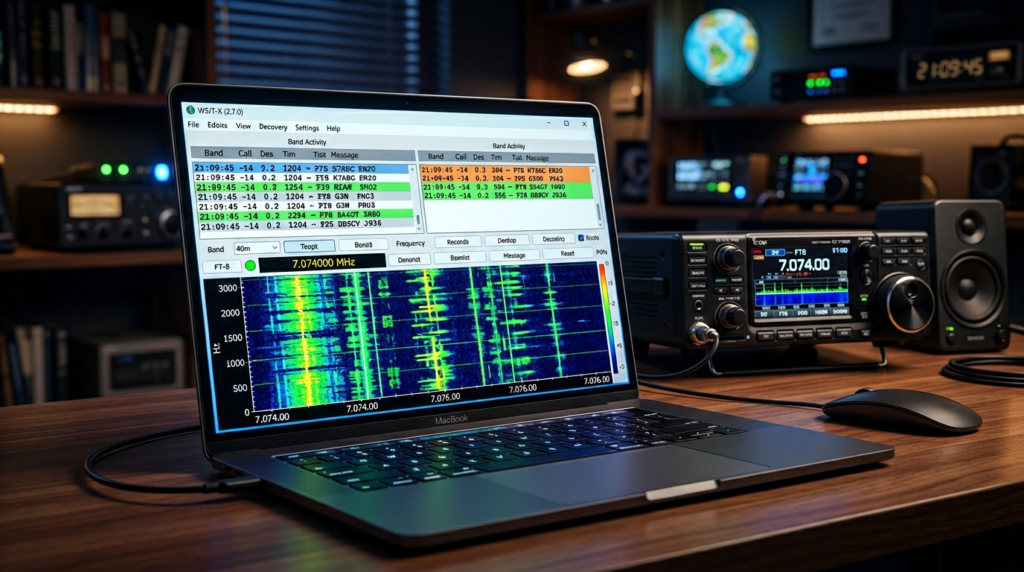
If you’ve been around ham radio for any length of time, you’ve probably heard the term FT-8 thrown around — maybe on a forum, a YouTube video, or while scrolling through the amateur radio subreddits. It comes up constantly. And if you’re new to the hobby, you might be wondering: what exactly is FT-8, and why does everyone seem so obsessed with it? This guide breaks it all down. No engineering degree required.
📦 Free Video Course – The Top 5 Beginner Ham Radio Frustrations (and How To Overcome Them)
Curious about ham radio but not sure where to start? Our free 5-day course tackles the 5 most common issues you might run into, addressed without any hype, technical jargon or sales pitches.
What Is FT-8?
FT-8 is a digital voice and data communication mode used by amateur radio operators to make contacts over long distances — sometimes thousands of miles — using relatively low power. It’s part of a family of modes developed by Joe Taylor (K1JT) and others, collectively known as WSJT-X modes.
The “FT” stands for Franke-Taylor, named after the two people who designed the encoding scheme. The “8” refers to the fact that it uses 8-FSK modulation — meaning it transmits data using 8 different tones. This technical foundation is what makes FT-8 remarkably robust even under poor band conditions.
Who Created FT-8?
FT-8 was created by Joe Taylor, K1JT — a Nobel Prize-winning physicist and lifelong amateur radio operator. Taylor developed the mode in collaboration with Steve Franke, K9AN. The first public release came out in 2017, and it quickly became one of the most popular digital modes in ham radio.
Taylor is also responsible for a whole suite of similar modes: FT-4, JT65, JT9, and others — all grouped under the WSJT-X software umbrella.
How Does FT-8 Actually Work?
With FT-8, instead of using your voice or CW to communicate over the airwaves, your computer does the talking. Without getting too deep into the engineering weeds, here’s what happens during an FT-8 contact:
- Encoding: Your message (callsign, signal report, and optional text) is encoded into a 77-bit message using a clever error-correction scheme.
- Transmission: The encoded data is transmitted over a 15-second cycle — 12.64 seconds transmitting, 2.36 seconds receiving. Both stations sync to UTC clock time, so they’re perfectly timed.
- Decoding: The receiving station’s software (WSJT-X) decodes your callsign and report from the noise floor — even when the signal is barely audible to human ears.
This 15-second sync cycle is one of the things that makes FT-8 so accessible. You don’t need to hunt for stations or call CQ for long periods. You simply configure your software, pick a frequency, and let the protocol do the work.
Why Is FT-8 So Popular?
FT-8 exploded in popularity for good reasons:
- Works when nothing else does. FT-8 can decode signals that are 10-15 dB below the noise floor. If HF conditions are terrible, FT-8 often still works when SSB or CW would be unreadable.
- It’s incredibly efficient. A 100-watt station with a modest antenna can work DX — Europe, Asia, South America — on a regular basis.
- Low barrier to entry. Once you have WSJT-X installed on a computer connected to your radio, you’re ready. No complex tuning, no skill required to decode signals.
- The community is huge. There are thousands of active FT-8 operators worldwide, meaning there’s always someone on the bands to work.
What Do You Need to Get Started with FT-8?
Getting on FT-8 requires slightly more than a basic handheld, but not much more. Here’s your minimum checklist:
1. A Suitable Radio
For HF FT-8, you’ll need a radio that supports split frequency operation (transmitting on a different frequency than you receive). Most modern HF transceivers support this natively. Popular options include:
- Yaesu FT-710 — Excellent value, built-in SDR display
- ICOM IC-7300 — Industry favorite, great receiver
- Any HF radio with SSB capability and a VFO that can operate split
Note: Technician class licensees can technically run FT-8 on 10 meters when conditions allow. For the full HF FT-8 experience on 20m, 40m, and other HF bands, you’ll want a General class license. Our Tech+General Accelerator course covers everything you need to upgrade and get on HF.
2. A Computer
Any reasonably modern computer (Windows, Mac, or Linux) will run WSJT-X. It doesn’t need to be powerful — an older laptop works fine.
3. WSJT-X Software
WSJT-X is free, open-source software developed by the K1JT team. You can download it at the official WSJT-X website.
4. An Interface Cable
You’ll need a way to connect your radio to your computer. If your radio supports it, a simple USB cable works for most setups.
5. An Antenna
Any antenna that works for SSB on HF will work for FT-8. A simple dipole, vertical, or even a random-wire antenna will get you on the air. FT-8’s efficiency means you don’t need a massive antenna farm to make contacts. I use my Buddistick Pro with FT-8 and it works great.
FT-8 vs. FT-4 vs. Other Digital Modes
You might also encounter FT-4, which is a faster variant of FT-8. Here’s the quick comparison:
- FT-8: 15-second cycles, higher decoding sensitivity, best for DX and weak-signal work
- FT-4: 7.5-second cycles, slightly faster but less robust, better for local/regional contacts
- JT65: Older mode, 60-second cycles, still used on some bands (mainly 6m and 2m)
- PSK31: Real-time keyboard-to-keyboard mode, different use case entirely
For most beginners, FT-8 is the starting point. Master it first, then explore the others if you’re interested.
Tips for FT-8 Beginners
- Sync your computer clock using NTP. FT-8 depends on precise timing. Use an NTP sync tool to keep your clock accurate within 1 second. The NetTime tool is free and works great.
- Start on 20 meters (14.074 MHz) — it’s the most active FT-8 band during daylight hours and a great place to start.
- Keep your transmit power reasonable. 25-100 watts is plenty for FT-8. More power isn’t better — it can actually cause interference with nearby receivers.
- Consider using an antenna tuner. High SWR will kill your antenna performance. The mAT-TUNER MAT-30 is a popular and affordable option that will help with this.
- Don’t be afraid to call CQ. The bands are full of hunters looking for new contacts. Your signal report is valuable to them too. FT-8 and POTA make a wonderful combination!
- Watch your IMD (intermodulation distortion). Make sure your radio is properly tuned and not overdriving. Clean signals decode better.
Frequently Asked Questions
FT-8: The Bottom Line
FT-8 is one of the most accessible and rewarding digital modes in ham radio. It lets you work the world with modest equipment, bridges the gap for beginners who aren’t comfortable with CW or phone, and rewards you with genuine DX contacts even on days when HF conditions are rough.
If you’re still working on your General class license, don’t let that stop you. Get WSJT-X installed, find a local club member who can help you configure split operation, and start listening. You’ll be amazed at what’s out there once you tune in.
Ready to upgrade your license and unlock the full HF experience? Check out the Tech+General Accelerator — our structured course for getting from Technician to General and actually understanding what you’re doing on the bands.
Join thousands of new hams who are confidently getting on the air. This practical video series gives you clear solutions to the most common beginner challenges — 100% free with instant access.
Affiliate Disclaimer
Keep in mind that we may receive commissions when you click our links and make purchases. However, this does not impact our reviews and comparisons. We try our best to keep things fair and balanced, in order to help you make the best choice.
As an Amazon Associate, we earn from qualifying purchases.