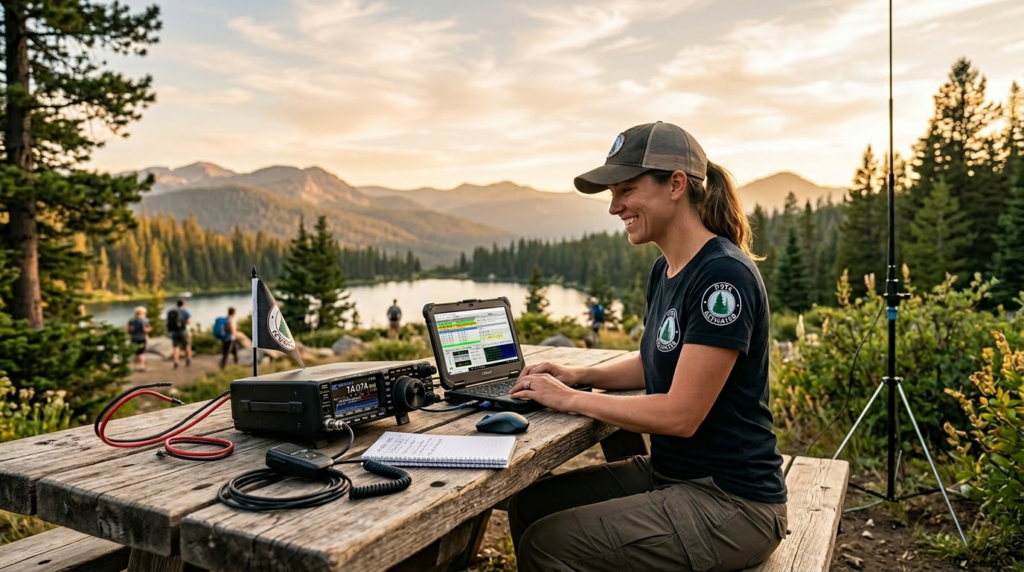
You’ve got your license. You’ve made some contacts on your radio from home or in your vehicle. Now you’re ready for something bigger. Enter POTA — Parks on the Air. If you’ve heard the term but aren’t sure what it actually involves, or if you’ve been putting off your first activation because it sounds complicated — this guide breaks it all down. No gatekeeping, no jargon overload. Just the steps you need to get your first valid POTA activation.
📦 Free Video Course – The Top 5 Beginner Ham Radio Frustrations (and How To Overcome Them)
Curious about ham radio but not sure where to start? Our free 5-day course tackles the 5 most common issues you might run into, addressed without any hype, technical jargon or sales pitches.
What Is POTA, Exactly?
POTA stands for Parks on the Air. It’s an amateur radio award program and community activity that turns any designated park into a portable ham radio location.
Here’s how it works:
- Amateur radio operators set up portable stations in parks (state parks, national parks, nature reserves — thousands of qualifying locations worldwide)…these are called “activators”
- There are also thousands of operators trying to reach the activators from their stations at home…these are called “hunters”
- If an activator in one park contacts an activator in another park, it counts as a “park-to-park” contact
- After the activation, logs are submitted to the POTA website
- Activators and hunters earn awards (digital certificates) based on the number of unique parks worked
The program is administered by the POTA Management Team and has official recognition from the ARRL and IARU. It’s one of the most popular outdoor ham radio activities in the world — with thousands of activators and hunters participating weekly.
Why activators love it:
- Turn any park into your radio shack — you can mix your love of nature and camping with ham radio and do both at the same time
- Portable operation is a completely different experience from home — you learn a lot about your gear under varying conditions
- The contacts can stack up fast once you’re spotted on a frequency
- The POTA community is genuinely welcoming — hunters want to work you
What License Do You Need for POTA?
Technician class is fine for your first activation (but General class – and the HF bands – is where the fun really happens).
A Technician license grants privileges on:
- All VHF and UHF bands (2 meters, 70 centimeters, and more)
- Limited HF privileges: 10 meters
For POTA, this means you can:
- Work local and regional contacts via VHF/UHF FM through repeaters
- Make 10-meter band contacts during daytime hours (when conditions are favorable)
Is it limited compared to General? Yes. But 10 meters can surprise you — especially during the spring and fall — and VHF/UHF POTA activations can be very active, especially on weekends. Just know that most of the POTA activity happens on the HF bands, which require a General class license or higher.
As you upgrade to General (and beyond), you’ll unlock HF POTA on more bands and longer-distance contacts. But don’t wait for that to start.
What Gear Do You Need for a POTA Activation?
The honest answer: less than you think.
For a simple VHF/UHF POTA activation with a Technician license, here’s a realistic minimum setup:
Radio:
- Any dual-band FM transceiver (2m/70cm). A handheld (HT) like a Yaesu FT-70DR might work for local contacts if there’s a repeater near the park; a mobile unit with more power like a Yaesu FTM-150R will give you better results, though
- Recommended: Most of the POTA action happens on HF! Get your General class licenseand then get something like a Yaesu FT-710 or ICOM IC-7300
Power:
- If you’re not using a handheld radio with it’s own battery, or a mobile radio in your vehicle, you need a portable battery pack (12V LiFePO4 or sealed lead acid) — essential if you’re not near a power source
- Something like the Bioenno BLF-15A gives you 3–5 hours or runtime, which is plenty
Antenna:
- Your HTs comes with a whip antenna — it works, but is limited
- A better option: a portable Yagi (directional) or a telescoping whip with better gain
- The Buddistick Pro is popular for POTA on the HF bands — lightweight, has everything you need in a small carrying case
Accessories:
- A folding chair and a small table (or the tailgate of your vehicle)
- Logging software of your choice
- Headphones, if you’re doing a voice activation (important in a noisy park environment)
- Water, sunscreen, bug spray — survival gear for any outdoor activity
Start simple. Add gear as you learn what you need.
How to Find a POTA Park
Head to pota.app and use the park search tool. You’ll see:
- Parks near your location (filter by state, country, or distance)
- Whether a park is currently being activated
- Recent activator activity at each park
For your first activation, pick a park you know well. Somewhere close, easy to access, with cell service (in case you need support). A state park near your home is ideal.
Your First POTA Activation: Step by Step
Here’s the exact sequence for a valid POTA activation using voice. You can also do digital activations using FT-8, but I’ll cover that in a separate article.
Step 1: “SPOT” YOURSELF on the POTA Website
Before you transmit, log in to your POTA account on pota.app and click “Add Spot.” Enter the frequency number you’ll be transmitting on and the reference number for the park you’re in, along with any comments. This officially registers your activation.
Step 2: Set Up Your Station
Find a good place to set up and get your rig unpacked.
- Connect your antenna to your radio
- Connect your radio to power and turn it on
- Tune to the frequency you listed in your Spot
- Get your logging software opened and ready to go (you can also use a paper logging sheet if you prefer)
Step 3: Announce Your Activation
On your chosen frequency, call:
> “CQ POTA, this is [your call sign], activating [park reference, e.g., US-1234], portable in [park name]. Listening.”
Keep it short. You’re announcing your presence — not making a long-form introduction.
Step 4: Work the Hunters
POTA hunters are hams who hunt activators — they call you, not the other way around.
When a hunter calls you:
1. Exchange callsigns (they go first)
2. Give a signal report: *”59 in [your location]”`
3. Confirm the park reference: “Confirm US-1234?”
4. Log it
Repeat for each contact.
Most POTA hunters are experienced operators who know the protocol. They’ll guide the exchange if you’re new. Don’t be afraid to ask for a repeat.
Step 5: Log Everything
Log each contact with:
- The other station’s call sign
- The signal report given/received
- The date and time (UTC)
- The park reference number
Logging software is a real time-saver here. The ADIF format is standard for exporting logs later.
Step 6: Close Out and Submit Your Log
When you’re done, announce your final contact:
> “This is [your call sign] closing out the activation of US-1234. 73 to all. QRZ.”
Submit your log through the POTA website. Once your log is validated (usually within 24–48 hours), your activation is confirmed and the park-to-park contacts count toward your awards.
How Many Contacts Do You Need for a Valid Activation?
10 contacts is considered to be a standard POTA activation.
That said — most activators don’t stop at ten. The goal is to be “spotted” on the POTA network so hunters know you’re on the air. Once you’re spotted, the contacts tend to come steadily for a 1–2 hour session. I always try to get a few extra to ensure the activation, just in case a few contacts get missed or fail for some reason.
If you want to go for POTA awards, they offer them for both hunters and activators:
- Bronze –10 unique parks worked
- Silver – 20 unique parks worked
- Gold – 30 unique parks worked
- Platinum – 40 unique parks worked
- Diamond – 50 unique parks worked
- Etc.
But for your first time, ten contacts is the win. Everything after that is a bonus.
Tips for Your First POTA Trip
- Start somewhere familiar. A park you know well removes the logistics variable.
- Keep the first session short. 1 hour is plenty, but keep going as long as you like.
- Go with a buddy if you can. Double the fun, two call signs (more activation options), and someone to problem-solve with if gear acts up.
- Check the weather. Your first activation doesn’t need to be in a thunderstorm.
- Have a backup plan for power. If your battery dies, a car cigarette lighter adapter can potentially keep you going.
What’s the POTA Community Like?
One of the most consistently praised things about POTA is the people.
Hunters — especially on HF — are often experienced operators who work hard to make contact with activators. Many will give you tips, congratulate you on your first activation, and send QSL cards (electronic or physical) confirming the contact.
The POTA forums and Facebook groups are active, helpful, and welcoming to first-timers. Don’t hesitate to ask questions before your activation — the community genuinely wants more activators.
Frequently Asked Questions
What is POTA and how does it work?
Parks on the Air (POTA) is an amateur radio award program that turns any designated park into a portable radio station. Activators set up portable stations in parks (state parks, national parks, nature reserves — thousands qualifying worldwide), and hunters try to work them from their home stations. After an activation, logs are submitted to the POTA website, and both activators and hunters earn awards based on the number of unique parks worked. The program is ARRL and IARU recognized and is one of the most popular outdoor ham radio activities in the world.
What license do I need for POTA?
A Technician class license is sufficient for your first POTA activation. You’ll have access to all VHF and UHF bands (2 meters, 70 centimeters, and more) plus limited 10-meter HF privileges. You can work local and regional contacts via VHF/UHF FM through repeaters and make 10-meter contacts during favorable conditions. However, most POTA activity happens on the HF bands, which require a General class license or higher — so as you upgrade, you’ll unlock longer-distance contacts on more bands. That said, don’t wait to start — VHF/UHF activations can be very active, especially on weekends.
What gear do I need for a POTA activation?
Less than you think. For a simple VHF/UHF activation with a Technician license, your minimum setup is: a dual-band FM transceiver (a handheld works for local contacts; a mobile unit with more power gives better results), a portable power source (12V LiFePO4 battery pack if you’re not using a handheld or your vehicle), and a better antenna than the stock whip (a portable Yagi or telescoping whip with more gain). Also bring: a folding chair, small table or tailgate, logging software (or paper sheet), headphones, water, sunscreen, and bug spray. For HF POTA, popular options include the Yaesu FT-710 or Icom IC-7300 with a lightweight antenna like the Buddistick Pro.
How do I find a POTA park?
Go to pota.app and use the park search tool. You can filter by state, country, or distance to find parks near your location. Each listing shows whether a park is currently being activated and recent activator activity. For your first activation, pick a park you know well — somewhere close, easy to access, with cell service in case you need support. A state park near your home is ideal.
How do I “spot” myself on the POTA website?
Before you transmit, log in to your POTA account on pota.app and click “Add Spot.” Enter the frequency you’ll be transmitting on, the reference number for the park you’re in (e.g., US-1234), and any comments. This officially registers your activation and lets hunters know you’re on the air.
What do I say when I call CQ for a POTA activation?
Keep it short and follow the standard format: “CQ POTA, this is [your callsign], activating [park reference, e.g., US-1234], portable in [park name]. Listening.” You’re announcing your presence — not making a long introduction. Hunters will call you, not the other way around. Most POTA hunters are experienced operators who know the protocol and will guide the exchange if you’re new.
How many contacts do I need for a valid POTA activation?
10 contacts is considered a standard POTA activation. Once you’re spotted on the POTA network, contacts tend to come steadily for a 1–2 hour session. Most activators go beyond ten — it’s smart to get a few extra to ensure the activation holds even if a few contacts fail to log. There are also award levels: Bronze (10 unique parks), Silver (20 unique parks), and Gold (30 unique parks) for both hunters and activators.
How do I log contacts during a POTA activation?
Log each contact with: the other station’s callsign, the signal report (“59 in [your location]”), the date and time in UTC, and the park reference number. Logging software is a real time-saver — ADIF format is the standard for exporting logs later. After your session, submit your log through the POTA website; once validated (usually 24–48 hours), your activation is confirmed and the park-to-park contacts count toward your awards.
Ready to Get Started?
POTA is one of the best ways to take your ham radio out of the shack and into the world. It’s a reason to explore parks, test your gear in different environments, and build real operating skills — all while making contacts with hams who are excited to work you.
You don’t need expensive gear. You don’t need a perfect setup. You just need to show up, turn on the radio, and start calling.
Head to pota.app, find a park near you, and plan your first activation.
And while you’re at it — subscribe to Ham Radio Launchpad on YouTube. We’ll be posting our own POTA activation videos so you can see the full setup process, the on-air exchanges, and what a real activation looks like from start to finish.
73 — see you in the park.
Join thousands of new hams who are confidently getting on the air. This practical video series gives you clear solutions to the most common beginner challenges — 100% free with instant access.
Affiliate Disclaimer
Keep in mind that we may receive commissions when you click our links and make purchases. However, this does not impact our reviews and comparisons. We try our best to keep things fair and balanced, in order to help you make the best choice.
As an Amazon Associate, we earn from qualifying purchases.