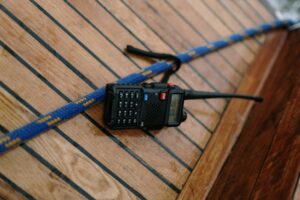
The Baofeng UV-5R is the most popular beginner ham radio on the market. It is cheap, capable, and everywhere. But here is the thing nobody tells you upfront: programming it is a pain in the neck.
The UV-5R does not come ready to use out of the box. You have to program in your local repeater frequencies, simplex channels, and NOAA weather channels manually — or use software to do it faster. Either way, this guide walks you through both methods, step by step.
📦 Get Your Free Ham Radio Beginner Checklist (Printable PDF)
The exact 5-step roadmap — gear recommendations, repeater programming, first contact checklist
Why the Baofeng UV-5R Is Hard to Program
Unlike Yaesu or Icom radios, the Baofeng UV-5R has a notoriously clunky menu system. The buttons are small, the labels are confusing, and one wrong press can send you three screens deep with no obvious way back. Add in that the manual is poorly translated, and most new hams give up before they ever make a contact. That is exactly why this guide exists. We will get you programmed and on the air in under 30 minutes.
What You Need Before You Start
- Baofeng UV-5R or BF-F8HP
- Baofeng USB programming cable — not a serial cable, USB. (~$8–12 on Amazon)
- A computer (Windows preferred; Mac works with CHIRP, too)
- CHIRP software — free at ChirpMyRadio.com
- Your local repeater frequencies — get them free at RepeaterBook.com
Method 1: Program with CHIRP Software (Recommended)
CHIRP is free, open-source software that works with dozens of radios including the UV-5R. It is the easiest way to program your Baofeng, and once you have your channels set up, you can save the file and reuse it anytime.
Step 1: Install CHIRP
- Go to ChirpMyRadio.com
- Click Downloads and select the version for your operating system
- Install the software — straightforward, just click through the prompts
Step 2: Connect Your Radio
- Turn your Baofeng UV-5R OFF
- Plug the USB cable into your computer
- Connect the other end to the Baofeng programming port (under the antenna)
- Turn the radio ON
- Make sure the radio is set to VFO MR mode (push VFO/MR until it says MR)
Step 3: Download Current Settings
- Open CHIRP on your computer
- Click Radio in the top menu
- Select Download From Radio
- Choose your port (usually COM3 or COM4 — check Device Manager if unsure)
- Select Baofeng UV-5R as the radio model
- Click OK — CHIRP will read your radio current settings
Step 4: Enter Your Local Frequencies
- Go to RepeaterBook.com
- Enter your location
- Filter for VHF/UHF and your nearest repeaters
- Note down: frequency, offset (+ or -), and tone/PL
- Back in CHIRP, click the first empty row in the channel list
- Enter: Loc (name), Frequency (output freq), Duplex (+ or -), Offset (usually 0.600 MHz for 2m), Tone (PL tone if required), Mode (FM)
- Repeat for all your local repeaters
Step 5: Upload to Your Radio
- In CHIRP, click Radio then Upload to Radio
- Confirm the port and model, click OK
Done! Switch to MR mode and use the arrow keys to scroll through your programmed channels.
Method 2: Manual Programming (No Computer Required)
If you are away from your computer and need to add a channel:
- Switch to VFO mode (press VFO/MR until VFO appears)
- Press MENU, enter 21 for frequency entry
- Enter the repeater frequency with the number keypad
- Press MENU to confirm
- Set TX Power (MENU 25), TX/RX Tone (MENU 26), Wide/Narrow (MENU 10), STEP (MENU 9)
- To save: press MENU, enter 27 (Memory Store), enter a channel number, press MENU
Use CHIRP for everything you can. Manual programming is genuinely difficult on the UV-5R.
How to Find Your Local Repeater Frequencies
- Go to RepeaterBook.com
- Enter your location
- Look for repeaters in 2m (144–148 MHz) and 70cm (420–450 MHz)
- Note the frequency, offset, and PL tone for each repeater
Pro tip: start with the closest or most active repeater. Ask your local club — hams are famously helpful to newcomers.
Do Not Forget: NOAA Weather Channels
Program these seven frequencies for NOAA weather broadcasts:
| Channel | Frequency (MHz) |
|---|---|
| WX 1 | 162.550 |
| WX 2 | 162.400 |
| WX 3 | 162.475 |
| WX 4 | 162.425 |
| WX 5 | 162.450 |
| WX 6 | 162.500 |
| WX 7 | 162.525 |
Set duplex to OFF for these — receive-only.
Baofeng UV-5R: Common Problems and Fixes
I can't hear anything on the programmed channels
Check that the PL tone is set correctly. If the repeater requires a 100.0 Hz tone and you set 88.5 Hz, you won't be able to access the repeater.
The radio won't connect to CHIRP
Make sure you are using a data USB cable (not a charge-only cable). Try a different USB port. Install the USB chipset driver if your computer doesn't recognize the cable.
I programmed a frequency but can't transmit
Make sure you are programming within the 144–148 MHz (2m) and 420–450 MHz (70cm) amateur bands.
Is the Baofeng UV-5R Worth It?
The Baofeng UV-5R is a great starter radio and a terrible only radio.
It is cheap enough that you will not feel bad taking it to the field, camping, or keeping one in your emergency kit. But the build quality is inconsistent, the audio is tinny, and programming is frustrating. Most new hams who stick with the hobby upgrade within a year.
If you can stretch your budget, the Yaesu FT-60R is a dramatically better radio for not much more money. But if $25 is your budget, the UV-5R will get you on the air — especially once you have finished this guide.
What to Do After You Program Your Baofeng
- Listen first — do not transmit unless you're licensed!
- Announce yourself — “This is [your callsign], monitoring”
- Find a local net — most clubs run a weekly net on a local repeater
- Practice on simplex — try 146.520 MHz (the national 2m calling frequency) and listen
- Get your first contact — once you feel comfortable, make your first call. Most hams are happy to work a newcomer.
Baofeng UV-5R Programming FAQs
Why is programming the Baofeng UV-5R so difficult for beginners, and what makes it different from other ham radios?
Unlike Yaesu or Icom radios, the Baofeng UV-5R has a notoriously clunky menu system. The buttons are small, the labels are confusing, and one wrong press can send you several screens deep with no obvious way back. The manual is also poorly translated, causing many new hams to give up before making their first contact.
What do I need to program my Baofeng UV-5R, and how do I use CHIRP software to do it?
You will need:
- A Baofeng UV-5R or BF-F8HP
- A genuine Baofeng USB programming cable (not charge-only)
- A computer (Windows preferred)
- Free CHIRP software from ChirpMyRadio.com
- Your local repeater frequencies from RepeaterBook.com
The recommended method is to install CHIRP, connect the radio in MR mode, download the current settings, enter frequencies (including offset, tone/PL, and mode), then upload to the radio. This process typically takes under 30 minutes.
How can I find and program local repeater frequencies and NOAA weather channels into my Baofeng UV-5R?
Visit RepeaterBook.com, enter your location, and filter for VHF/UHF repeaters. Note the frequency, offset (+ or -), and PL tone for each. In CHIRP, enter these details into the channel list.
For NOAA weather channels, program these receive-only frequencies with duplex set to OFF:
- WX 1: 162.550 MHz
- WX 2: 162.400 MHz
- WX 3: 162.475 MHz
- WX 4: 162.425 MHz
- WX 5: 162.450 MHz
- WX 6: 162.500 MHz
- WX 7: 162.525 MHz
What should I do if my Baofeng UV-5R won't connect to CHIRP or I can't hear anything on the programmed channels?
Connection issues: Use a proper data USB cable (not charge-only). Try a different USB port and install the correct chipset driver if the computer does not recognize the cable. Ensure the radio is powered on in MR mode.
No audio on channels: The most common cause is an incorrect PL tone. Verify the exact tone required by the repeater and match it precisely in CHIRP.
Is the Baofeng UV-5R worth buying as a first ham radio, and what should I do after programming it?
The UV-5R is an excellent and affordable starter radio, but it has limitations in build quality and audio. It is ideal for emergency kits, field use, or camping. Most serious hams upgrade within a year.
After programming:
- Always listen first — do not transmit without a valid amateur radio license.
- Monitor local repeaters and announce yourself with your callsign.
- Join a local club net and practice on simplex (e.g., 146.520 MHz).
Ready to Get Started? Grab Your Free Ham Radio Starter Checklist!
Thinking about getting started in ham radio but not sure where to begin? We've created a free checklist that walks you through every step – from studying for the Technician exam to buying your first radio.
Affiliate Disclaimer
Keep in mind that we may receive commissions when you click our links and make purchases. However, this does not impact our reviews and comparisons. We try our best to keep things fair and balanced, in order to help you make the best choice.
As an Amazon Associate, we earn from qualifying purchases.